
30 October 2026
GitHub Copilot vs Cursor: what AI assistants recommend
GitHub Copilot is the AI coding assistant that AI assistants name most, and Cursor is second. On 29 October 2026, across 148 answers from ChatGPT, Claude, Perplexity, Google AI Mode and Google AI Overview, Copilot was named in 118 (80%) and Cursor in 103 (70%). When both were named, Copilot came first in 75 of 102 answers. Copilot was named without Cursor 16 times; Cursor without Copilot once. The assistants treat Copilot as the default that fits any editor, and Cursor as the AI-first editor you switch to for deeper, multi-file work.
The short answer, in numbers
We asked 10 buyer questions about AI coding assistants, 3 times each, on five AI engines, and stored every answer. The two products are the top two of more than 20 tools on the AI coding assistant leaderboard.
| GitHub Copilot | Cursor | |
|---|---|---|
| Answers naming it (of 148) | 118 (80%) | 103 (70%) |
| 95% interval | 73%–85% | 62%–76% |
| Average position when named | 1.5 | 2.3 |
| Rank on the full leaderboard | #1 | #2 |
| Named first, when both were named (102 answers) | 75 | 27 |
| Named without the other | 16 | 1 |
By AI engine: Claude names both every time
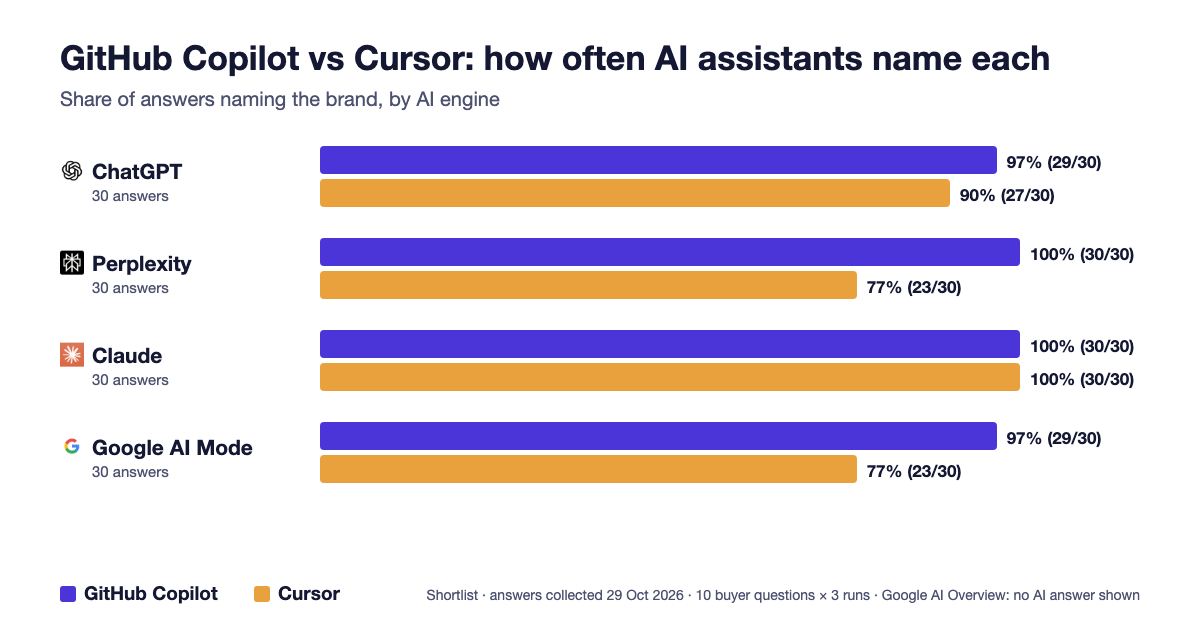
Claude named both products in all 30 of its answers. ChatGPT was nearly as even, 29 against 27. Perplexity (30 against 23) and Google AI Mode (29 against 23) showed the widest gaps. Google AI Overview showed no overview for any of these questions, so neither was named there.
By question: IDE support is the big split
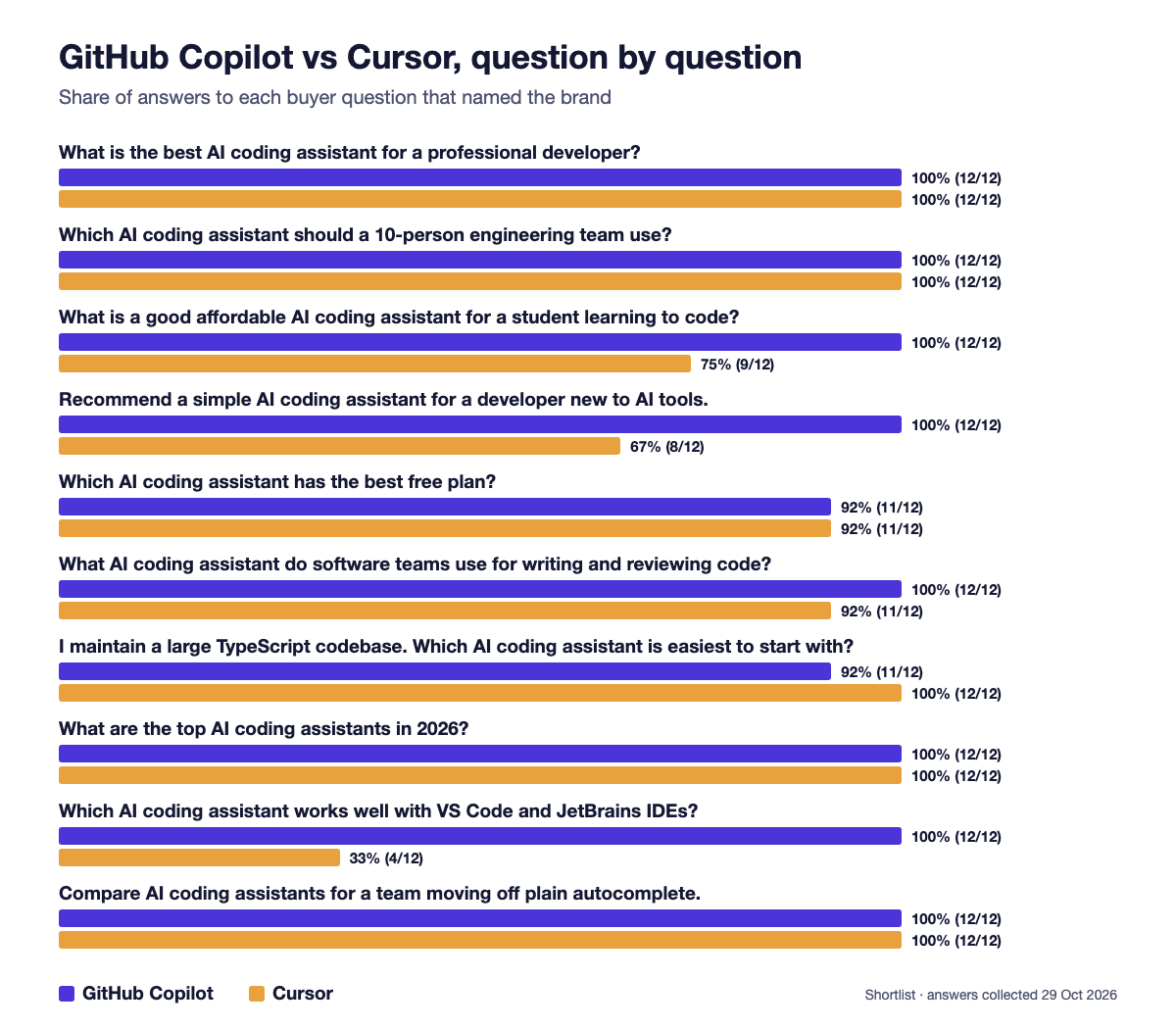
On six of the ten questions, both were named in all or all but one of the answers. The gap comes from the question about VS Code and JetBrains IDEs, where Copilot was named in 12 of 12 answers and Cursor in 4, because Cursor is its own editor rather than a plugin. Copilot also led on the beginner (12 against 8) and student (12 against 9) questions. The only question where Cursor was named more often was the large TypeScript codebase, 12 against 11.
| Buyer question | GitHub Copilot | Cursor |
|---|---|---|
What is the best AI coding assistant for a professional developer? | 12/12 | 12/12 |
Which AI coding assistant should a 10-person engineering team use? | 12/12 | 12/12 |
What are the top AI coding assistants in 2026? | 12/12 | 12/12 |
Compare AI coding assistants for a team moving off plain autocomplete. | 12/12 | 12/12 |
What AI coding assistant do software teams use for writing and reviewing code? | 12/12 | 11/12 |
Which AI coding assistant has the best free plan? | 11/12 | 11/12 |
I maintain a large TypeScript codebase. Which AI coding assistant is easiest to start with? | 11/12 | 12/12 |
What is a good affordable AI coding assistant for a student learning to code? | 12/12 | 9/12 |
Recommend a simple AI coding assistant for a developer new to AI tools. | 12/12 | 8/12 |
Which AI coding assistant works well with VS Code and JetBrains IDEs? | 12/12 | 4/12 |
How the assistants describe each one
Copilot is described as the low-friction default: it works inside the editors developers already use, connects to GitHub, and is the usual pick for teams that want one standard tool. Cursor is described as the more powerful AI-first editor, with codebase indexing and a multi-file agent, at the cost of moving editors. A few excerpts, quoted as the assistants wrote them:
GitHub Copilot is the easiest to start with, with Cursor as the main alternative if you want more power and don't mind switching editors.
GitHub Copilot is the easiest starting point for a large TypeScript codebase—especially if you already use VS Code or JetBrains.
Cursor is more likely than Copilot to change day-to-day development behavior, but that also means editor migration, extension compatibility, and training become part of the rollout.
If your team is set on JetBrains, Cursor means moving off that setup entirely.
What this means if you are choosing
This is a record of what AI assistants say, not a product test. As a map of positioning: if you want to keep your editor, especially a JetBrains IDE, or you are new to AI tools, the assistants point to GitHub Copilot. If you are willing to switch editors for deeper multi-file and codebase-wide work, they point to Cursor. Several answers suggest a team default of Copilot with Cursor for the developers who want more.
For the third name in this category, see our Cursor vs Claude Code comparison. The full ranking, with every engine and every stored answer, is on the AI coding assistant leaderboard.
Questions
Do AI assistants recommend GitHub Copilot or Cursor more?
GitHub Copilot. On 29 October 2026 it was named in 118 of 148 answers (80%) and Cursor in 103 (70%). When both were named, Copilot came first in 75 of 102 answers.
Which is recommended for JetBrains IDEs?
GitHub Copilot. On the VS Code and JetBrains question it was named in 12 of 12 answers and Cursor in 4, since Cursor is a separate editor rather than a plugin.
Which is recommended for large codebases?
Both, almost equally. On the large TypeScript codebase question Cursor was named in 12 of 12 answers and Copilot in 11, the only question where Cursor led.
Does Claude recommend Copilot or Cursor?
Both. Claude named GitHub Copilot and Cursor in all 30 of its answers in our run.
How was this measured?
We asked 10 buyer questions, 3 times each, on five AI engines with web search on, stored every answer verbatim, and counted which brands each answer named and in what order. Details are on our methodology page.
Related guides
- ChatGPT visibility: is your brand in the answer?
- AI share of voice
- Gemini visibility: is Google's assistant naming you?